
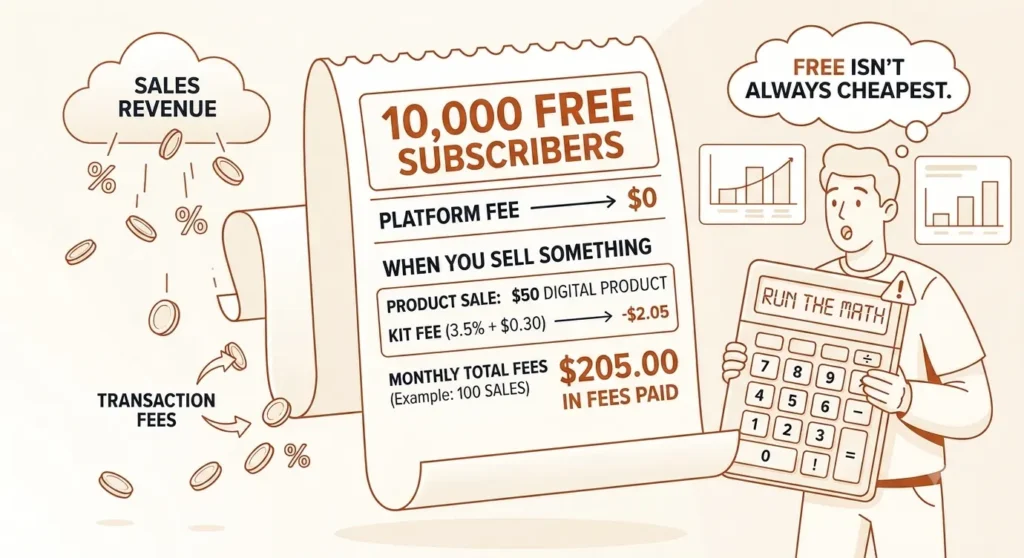
Kit’s free plan gives you 10,000 subscribers at $0. That’s four times what beehiiv offers and twenty times Mailchimp. For free newsletters, it’s the best deal in the category — and it’s not close.
But the moment you sell anything through Kit — a digital product, a paid newsletter, a tip jar — a 3.5% + $0.30 fee hits every transaction. Every plan. Including free. Most reviews call this “low” and move on. We signed up, opened every menu, and did the math at three revenue levels. The fee isn’t the whole story. The combination of fees is.
Kit Review: The Verdict (Read This First)
Quick answer: Is Kit worth it?
Kit is worth it if you only send free newsletters (10,000 subscribers at $0 is unmatched) or if you’re earning over $1,000/month in sales and need email + commerce in one platform. Below $500/month revenue, the Creator plan’s $39/month subscription plus 3.5% transaction fees take 14.3% of your income — worse than Substack’s 10% cut. At that level, beehiiv’s free plan keeps more of your money. (All paid-plan figures below use monthly billing for easier comparison.)
SharpScroll earns an affiliate commission if you sign up through some links on this page — including free-plan signups. It never changes our verdict or the fee math. Pricing, free-plan limits, transaction fees, country support, and affiliate terms can change; we verify from official pages where possible, but always check the tool’s current pricing before buying. Last verified: June 21, 2026.
What Kit Is (and Isn’t)
Kit — formerly ConvertKit, rebranded October 2024 — is where over 600,000 creators send their newsletters. Bloggers, course sellers, podcasters, coaches. It combines email marketing, automations, subscriber tagging, and built-in commerce in a single dashboard. In September 2025, Kit roughly doubled its paid-plan prices, and that changed the calculus for a lot of creators.
Here’s what Kit isn’t: a design tool. We opened Kit’s email template library and found exactly one option — “Text only.” One. No drag-and-drop visual layouts, no image-heavy campaigns, no design customization beyond bold, italic, and alignment. If your brand depends on polished visual emails, Kit will frustrate you from the first send.
What Kit does well is keep everything in one place. Create a digital product, set up a paid newsletter, build an automation — all without leaving the platform. That’s the pitch. The question is what it actually costs once you start selling.
What Does Kit’s Free Plan Actually Include?
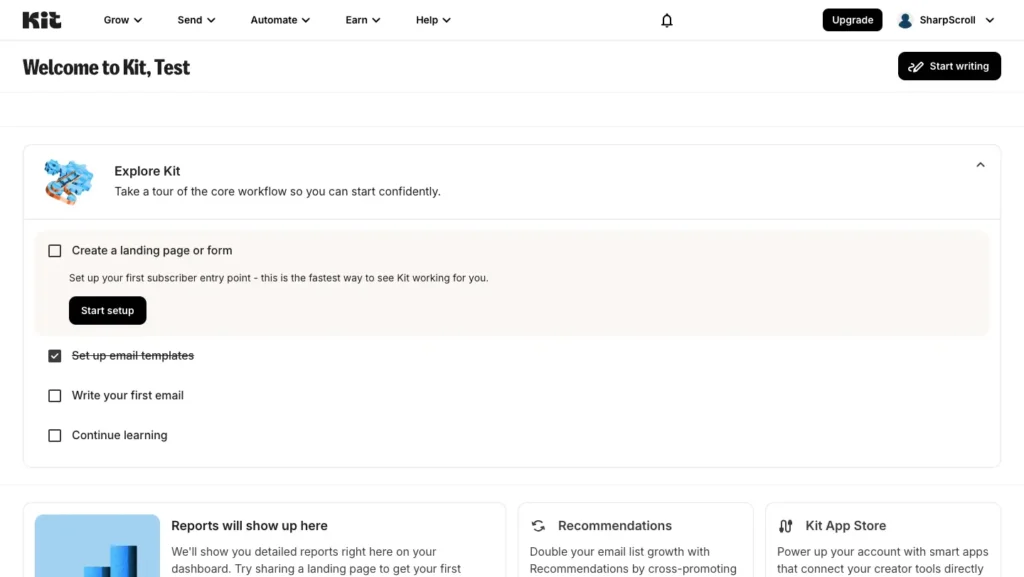
We created an account on Kit’s free Newsletter plan and clicked through every section. The generous parts are real — and the walls are very real too.
What works: unlimited broadcast emails to up to 10,000 subscribers. Unlimited landing pages and forms. Subscriber tagging and segmentation. And you can sell digital products, run a paid newsletter, and accept tips — commerce isn’t locked behind a paywall. That’s more than most free plans offer.
Then you start exploring the menus.
We opened the Automate dropdown and saw four items tagged “Paid feature” — Visual Automations, Rules, RSS campaigns, and App integrations. The free plan gives you exactly one basic automation. One welcome sequence. That’s your entire automation toolkit.
The Send menu tells the same story. Broadcasts and Snippets work. Email Sequences? Tagged “Paid feature.” You can blast one-off emails all day, but building a multi-step drip campaign beyond your single automation means upgrading.
Under Earn, Products and Tips are free — that’s the commerce part. But Paid Recommendations and Newsletter Sponsorships both carry “Paid feature” badges. You can sell your own stuff, but you can’t earn from recommending other creators or connecting with sponsors until you pay.
Here’s the part that stings: under Grow, Kit’s Recommendations feature is marked “Paid feature” — but the free plan requires you to show recommendations to your subscribers. Kit forces this on. You promote other creators’ newsletters; they don’t pay you for it. That’s a hidden cost of the free plan that most reviews don’t mention.
And then there’s the branding. Every email we composed showed “Built with Kit” locked at the bottom of the editor. Every form. Every landing page. You can’t remove it without Creator ($39/month).
The free plan in one line: enormous subscriber capacity, real commerce access, but a one-automation ceiling, forced branding, forced unpaid recommendations, zero integrations, and email-only support. A generous sandbox with short walls.
Last verified: June 21, 2026, from kit.com/pricing and our live account.
How Much Does Kit Really Cost? The Fee Math Nobody Shows
Kit charges 3.5% + $0.30 per transaction on every digital product sale, paid newsletter charge, and tip. All tiers. Including free. This is the part most Kit reviews skip entirely.
Here’s what most people miss: that 3.5% isn’t all Kit’s money. Kit’s official pricing page spells it out — Kit takes 0.6%, and Stripe (the payment processor underneath) takes the remaining 2.9% + $0.30. They bundle both into one charge. You never see two line items on your statement.
Why should you care about that breakdown? Because if you sell on beehiiv instead, you’d still pay Stripe’s ~2.9% + $0.30. Kit’s actual extra cost over beehiiv is 0.6% — that’s $3/month at $500 in revenue. Not the scary number the headline implies.
So where does Kit get expensive? The platform subscription stacking on top of transaction fees. The moment you need more than one automation — and you will, the moment you start selling — you’re paying $39+/month for Creator plus losing 3.5% + $0.30 per sale. That double hit is what adds up. (All Kit paid-plan figures in this review use monthly billing to match our beehiiv review comparisons. Annual billing saves ~16%.)
Model: $10/month paid newsletter subscription.
Kit Free Plan (under 10,000 total subscribers)
| Revenue/mo | Paid Subs | Transaction Fees (3.5% + $0.30) | Platform Fee | Total Cost | You Keep |
|---|---|---|---|---|---|
| $500 | 50 | $32.50 | $0 | $32.50 | $467.50 (93.5%) |
| $1,000 | 100 | $65.00 | $0 | $65.00 | $935.00 (93.5%) |
| $5,000 | 500 | $325.00 | $0 | $325.00 | $4,675 (93.5%) |
If you can live with one automation, forced branding, and zero integrations, the free plan is solid for commerce. You keep 93.5 cents of every dollar at any revenue level.
Kit Creator Plan (monthly billing)
Selling anything serious with one automation isn’t realistic. A welcome sequence, a sales funnel, a nurture flow — that’s three automations minimum. So you’re on Creator, and the subscription scales with your total list size (not just paid subscribers). Figures below use monthly billing; annual saves ~16%.
| Revenue/mo | Paid Subs | Transaction Fees | Platform Fee (monthly) | Total Cost | You Keep |
|---|---|---|---|---|---|
| $500 | 50 | $32.50 | $39 (1K subs) | $71.50 | $428.50 (85.7%) |
| $1,000 | 100 | $65.00 | $39 (1K subs) | $104 | $896 (89.6%) |
| $5,000 | 500 | $325.00 | $139 (10K subs) | $444 | $4,536 (90.7%) |
At $500/month revenue on Creator, you’re losing 14.3% of your income to Kit. That’s worse than Substack’s flat 10% cut at the same level. The math only starts favoring Kit once your revenue is high enough for the all-in-one convenience to outweigh the double cost.
Fee math uses monthly billing to match our beehiiv review comparisons. Annual billing saves ~16% ($33/mo Creator at 1K subs). Last verified: June 21, 2026.
Kit vs beehiiv vs Substack: Quick Cost Comparison
Full breakdown in our beehiiv vs Kit comparison. Here’s the short version:
| Platform | $500/mo Revenue | $5,000/mo Revenue |
|---|---|---|
| Kit (Creator, monthly) | Keeps $428.50 (85.7%) | Keeps $4,536 (90.7%) |
| beehiiv (free at $500; Scale at $5K) | Keeps ~$470.50 (94.1%) | Keeps $4,609 (92.2%) |
| Substack | Keeps ~$420.50 (84.1%) | Keeps ~$4,205 (84.1%) |
Kit sits in the middle. Cheaper than Substack at every level. More expensive than beehiiv at every level — but the gap is narrower than “3.5% vs 0%” suggests, because beehiiv creators still pay Stripe’s processing fee. Note: beehiiv’s free plan caps at 2,500 subscribers, so the $5,000/mo column assumes beehiiv Scale ($96/mo annual). Kit figures use monthly billing; annual saves ~16%. See our beehiiv review for the full fee math at every tier.
Kit figures use monthly billing; annual saves ~16%. beehiiv at $500/mo assumes the free plan (under 2,500 subs); at $5,000/mo assumes Scale ($96/mo annual). See our beehiiv review for the full paid-plan comparison. Fee math verified June 21, 2026.
Kit Free vs Creator vs Pro: Which Plan Do You Need?
| Feature | Newsletter (Free) | Creator ($39/mo) | Pro ($79/mo) |
|---|---|---|---|
| Subscribers | Up to 10,000 | 1,000+ (scales) | 1,000+ (scales) |
| Visual automations | 1 (basic) | Unlimited | Unlimited |
| Email sequences | 1 | Unlimited | Unlimited |
| Remove Kit branding | No | Yes | Yes |
| A/B testing | 2 subject lines | 2 subject lines | 5 + content |
| Integrations | None | 100+ apps | 100+ apps |
| Users | 1 | 2 | Unlimited |
| Engagement scoring | No | No | Yes |
| Referral system | No | No | Yes |
| Paid Recommendations | No | Yes (23.5% fee) | Yes (23.5% fee) |
| Newsletter sponsorships | No | Yes | Yes |
| Support | Email only | 24/7 chat | 24/7 priority |
| Transaction fees | 3.5% + $0.30 | 3.5% + $0.30 | 3.5% + $0.30 |
Prices at 1,000 subscribers, monthly billing. Annual billing saves ~16% ($33/mo Creator, $66/mo Pro). Last verified: June 21, 2026.
Pro is only worth it if you need the newsletter referral system, engagement scoring, or deliverability reporting. For most solo creators, Creator is the right paid tier. The real decision is the jump from free to Creator — that’s where the cost changes everything.
Kit’s Strengths: What It Gets Right
The free plan’s subscriber limit is unmatched. 10,000 subscribers at $0 with unlimited sends. beehiiv caps at 2,500. MailerLite drops to 250 subscribers in July 2026. If you’re building a free newsletter and don’t need automations yet, start here.
Commerce is built in, even on free. We opened the Products page and found two buttons: “Set up payments” and “Create a product.” No Gumroad, no separate checkout tool, no stitching three platforms together. Connect Stripe once and you’re selling. That simplicity is real.
The subscriber system is clean. Three import options — add one, upload CSV, or auto-migrate from another provider. Tagging and segmentation work on free. The interface stays out of your way.
Content snippets are a quiet power feature. Reusable blocks you drop into any broadcast — consistent CTAs, signatures, recurring sections. Available on all plans. Small feature, saves real time.
Kit’s Weaknesses: Where It Falls Short
One email template. Literally one. We opened the Email Templates section expecting at least a basic library. We found “Text only” — labeled Classic, Default. That’s it. The entire selection. If you want visual emails, you’re building from scratch or accepting Kit’s deliberately plain look.
The September 2025 price hike stings. Creator went from ~$15/month to $39/month (or $33 on annual billing) — more than double overnight. Existing customers were migrated at renewal. The pricing that once made Kit a value leader is gone.
Pricing scales fast with list size. Creator at 5,000 subscribers costs $89/month. At 10,000, it jumps to $139/month. beehiiv’s Scale plan covers 10,000 subscribers for $109/month with 0% commerce take. The gap widens as you grow.
You pay for subscribers who stopped reading. Kit counts every confirmed email toward your billing tier — including people who haven’t opened in six months. No automatic cleanup. No inactive bucket at a lower rate. You prune manually or you overpay quietly.
“Paid feature” badges are everywhere on free. We counted them across the navigation: Visual Automations, Rules, RSS, Apps, Email Sequences, Paid Recommendations, Newsletter Sponsorships, Recommendations. The free plan is generous on subscriber count and stingy on almost everything else.
Who Should Use Kit
Use Kit if you want email marketing and commerce under one roof, you prefer plain-text-style emails that feel personal, and you want the largest free subscriber tier in the market.
The sweet spot: a creator with 1,000–5,000 subscribers who sells one or two digital products or a paid newsletter, needs clean automations, and doesn’t care about visual email design. Kit handles that entire workflow without bolting on external tools. At that scale, Creator costs $39–$89/month — a fair price for the convenience.
Who Should NOT Use Kit
Skip Kit if you’re selling under $500/month and need automations. On Creator, your total cost hits $71.50/month ($39 subscription + $32.50 in transaction fees on $500 revenue) — 14.3% of your income. beehiiv’s free plan gets you the same revenue at ~$29.50 in Stripe-only fees. Use beehiiv until your revenue justifies the subscription cost.
Skip Kit if budget matters above 1,000 subscribers. MailerLite’s paid plan starts at ~$15/month for 1,000 subscribers — less than half Kit’s $39. You lose built-in commerce, but if you’re not selling through your email platform, you’re paying double for features you won’t touch.
Skip Kit if visual emails matter to your brand. One template. One. If your audience expects designed, image-rich campaigns, Kit’s editor will fight you on every send. Look at MailerLite or beehiiv instead.
Final Verdict: Is Kit Worth It?
Kit earns its reputation with creators. The free plan’s 10,000-subscriber limit is the strongest in the category, and the built-in commerce means you can sell without stitching together three different tools. The automation builder is intuitive. The subscriber management is clean.
But the math tells a sharper story. Kit’s 3.5% transaction fee is mostly Stripe (2.9%) — Kit’s actual cut is only 0.6%. That’s fair. The real cost pressure comes from the Creator subscription ($39–$139+/month on monthly billing) stacking on top of those transaction fees the moment you outgrow the single-automation limit. At $500/month revenue, you keep 85.7% on Kit Creator versus 94.1% on beehiiv free. That gap matters when you’re early.
The bottom line: for free newsletters, Kit’s free plan wins outright. For selling, run the numbers at your revenue level first. The combination of subscription + transaction fees quietly outpaces simpler alternatives until you’re earning enough for the all-in-one convenience to justify the premium.
For the latest fees across all 15 creator tools, check the SharpScroll Pricing Tracker. For beehiiv’s full breakdown, see our beehiiv Review.